
Everything you need to run your restaurant
From table management to kitchen operations, AdvEnt Diner has every tool you need to streamline your restaurant and delight your customers.

Table Billing & Dine-in Orders
Seamlessly manage dine-in customers with intuitive table-based ordering and billing.
Table Billing & Dine-in Orders
Efficiently manage dine-in operations with table-wise order and billing management. Assign orders to specific tables and track real-time status from seating to billing. This feature provides end-to-end visibility of table lifecycle, helping staff manage peak hours efficiently. It ensures smooth coordination between service staff, kitchen, and billing counters.
Key Benefits
- Faster table service and order accuracy
- Clear visibility of occupied, reserved, and free tables
- Reduced billing errors
- Improved customer dining experience
How It Works
Servers select a table from the digital table layout and place orders directly. Orders remain linked to the table until checkout. The system continuously updates table status across all connected POS devices.

Efficiently manage dine-in operations with table-wise order and billing management. Assign orders to specific tables and track real-time status from seating to billing. This feature provides end-to-end visibility of table lifecycle, helping staff manage peak hours efficiently. It ensures smooth coordination between service staff, kitchen, and billing counters.
Key Benefits
- Faster table service and order accuracy
- Clear visibility of occupied, reserved, and free tables
- Reduced billing errors
- Improved customer dining experience
How It Works
Servers select a table from the digital table layout and place orders directly. Orders remain linked to the table until checkout. The system continuously updates table status across all connected POS devices.

Split Check & Merge Check
Easily split checks between guests or merge multiple tables into a single bill.
Split Check & Merge Check
Easily split bills by guest, item, or amount, or merge multiple checks into one for flexible billing. This functionality is ideal for families, groups, corporate dining, and shared tables. It eliminates manual calculations and billing confusion at checkout.
Key Benefits
- Convenient billing for groups and parties
- Eliminates confusion during payment
- Faster checkout and table clearance
- Improves customer satisfaction
How It Works
Staff can split or merge checks directly from the billing screen. Each resulting bill is processed independently with its own payment and tax calculation.
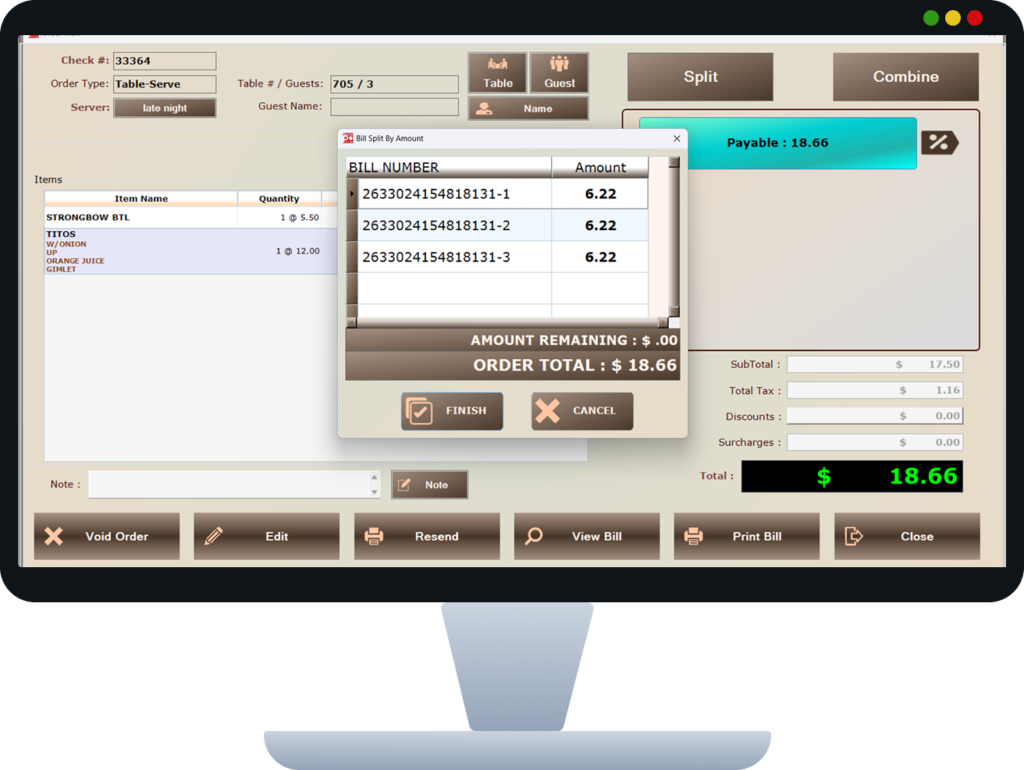
Easily split bills by guest, item, or amount, or merge multiple checks into one for flexible billing. This functionality is ideal for families, groups, corporate dining, and shared tables. It eliminates manual calculations and billing confusion at checkout.
Key Benefits
- Convenient billing for groups and parties
- Eliminates confusion during payment
- Faster checkout and table clearance
- Improves customer satisfaction
How It Works
Staff can split or merge checks directly from the billing screen. Each resulting bill is processed independently with its own payment and tax calculation.

Server & Waiter Order Entry
Empower your waitstaff with mobile order entry directly from the table.
Server & Waiter Order Entry
Enable waiters to take orders quickly using POS terminals, tablets, or mobile devices. The interface is designed for fast-paced restaurant environments, minimizing training time for staff. It ensures accurate order capture while reducing dependency on handwritten notes.
Key Benefits
- Reduced order-taking time
- Improved accuracy compared to manual notes
- Real-time order transmission to kitchen
- Increased table turnover
How It Works
Waiters log in using assigned credentials and select the table before entering orders. Orders are instantly synchronized with kitchen systems and billing modules.
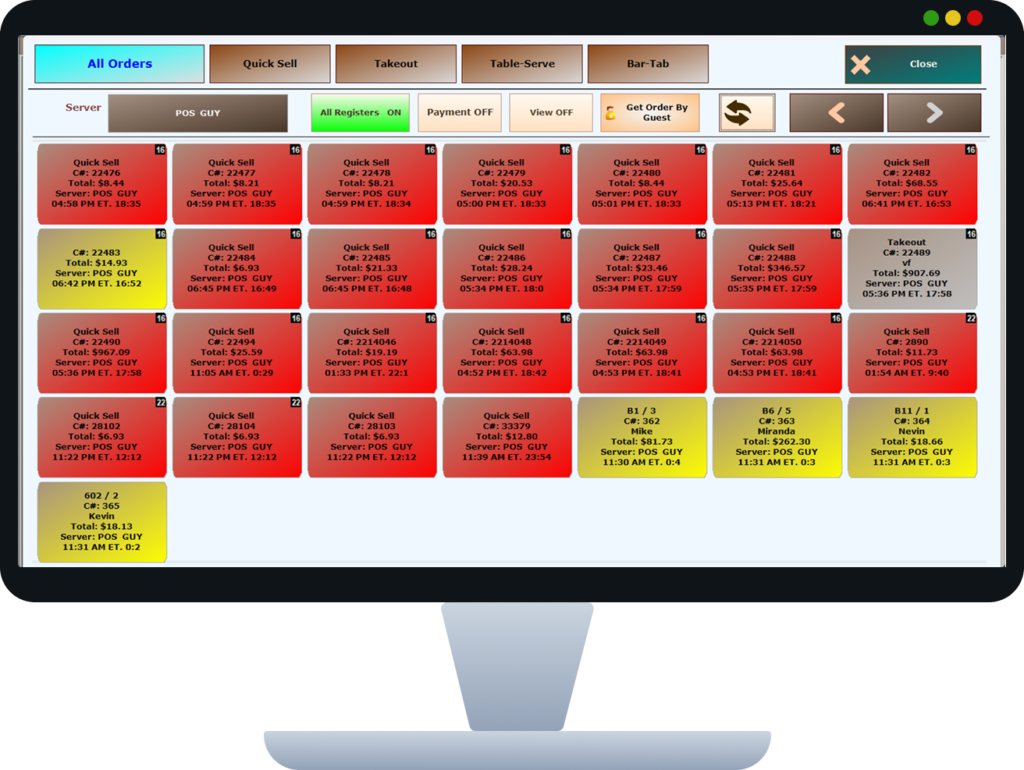
Enable waiters to take orders quickly using POS terminals, tablets, or mobile devices. The interface is designed for fast-paced restaurant environments, minimizing training time for staff. It ensures accurate order capture while reducing dependency on handwritten notes.
Key Benefits
- Reduced order-taking time
- Improved accuracy compared to manual notes
- Real-time order transmission to kitchen
- Increased table turnover
How It Works
Waiters log in using assigned credentials and select the table before entering orders. Orders are instantly synchronized with kitchen systems and billing modules.

Multiple Ticket Printing
Route orders automatically to Kitchen, Bar, or Counter printers.
Multiple Ticket Printing
Automatically print order tickets for different departments such as kitchen, bar, or dessert station.
This feature ensures smooth coordination across departments and prevents bottlenecks during peak hours. It helps staff focus only on relevant items assigned to their station.
Key Benefits
- Organized kitchen workflow
- Faster order preparation
- Reduced staff confusion
- Better coordination between departments
How It Works
Items are mapped to specific printers based on category or station. Tickets are generated automatically once the order is confirmed.
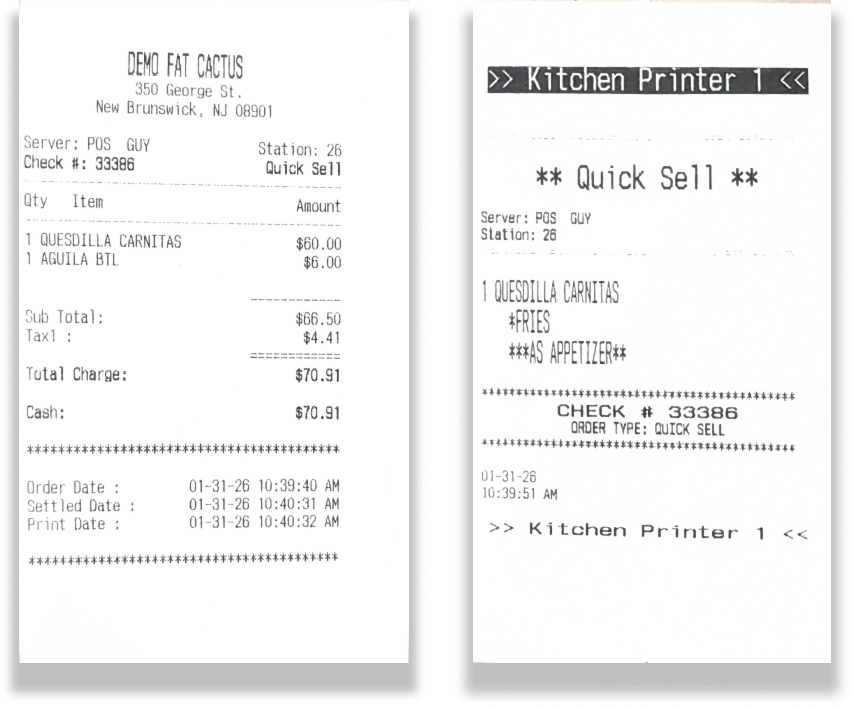
Automatically print order tickets for different departments such as kitchen, bar, or dessert station.
This feature ensures smooth coordination across departments and prevents bottlenecks during peak hours. It helps staff focus only on relevant items assigned to their station.
Key Benefits
- Organized kitchen workflow
- Faster order preparation
- Reduced staff confusion
- Better coordination between departments
How It Works
Items are mapped to specific printers based on category or station. Tickets are generated automatically once the order is confirmed.

Item Modifiers
Customize orders with modifiers like Extra Cheese, No Onion, Spicy, and more.
Items Modifiers
Allow customization of menu items with add-ons, preferences, and special instructions. This enables restaurants to meet individual customer preferences without disrupting kitchen workflows. Modifier pricing also supports upselling opportunities.
Key Benefits
- Higher customer satisfaction
- Accurate fulfillment of special requests
- Increased average order value
- Reduced kitchen errors
How It Works
Modifiers are selected during order entry and linked to the base item. The POS sends modifier details clearly to the kitchen or preparation station.
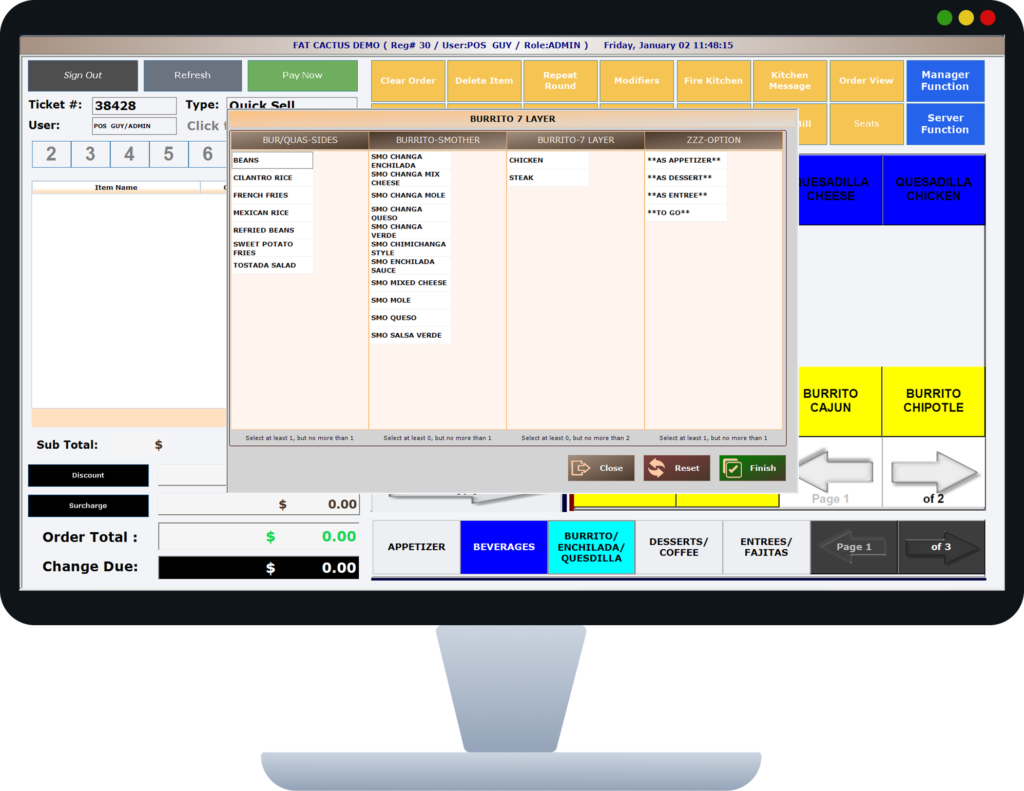
Allow customization of menu items with add-ons, preferences, and special instructions. This enables restaurants to meet individual customer preferences without disrupting kitchen workflows. Modifier pricing also supports upselling opportunities.
Key Benefits
- Higher customer satisfaction
- Accurate fulfillment of special requests
- Increased average order value
- Reduced kitchen errors
How It Works
Modifiers are selected during order entry and linked to the base item. The POS sends modifier details clearly to the kitchen or preparation station.

Happy Hour Pricing
Set time-based automatic pricing for drinks and food during happy hours.
Happy Hour Pricing
Automatically apply special pricing during predefined happy hour time slots. This encourages customer visits during slow periods and increases overall revenue. Pricing rules remain consistent across all POS devices.
Key Benefits
- Increased sales during low-traffic hours
- Eliminates manual discounting
- Ensures consistent pricing
- Boosts promotional effectiveness
How It Works
Time-based pricing rules are configured in advance. The POS activates special pricing automatically during the defined hours.
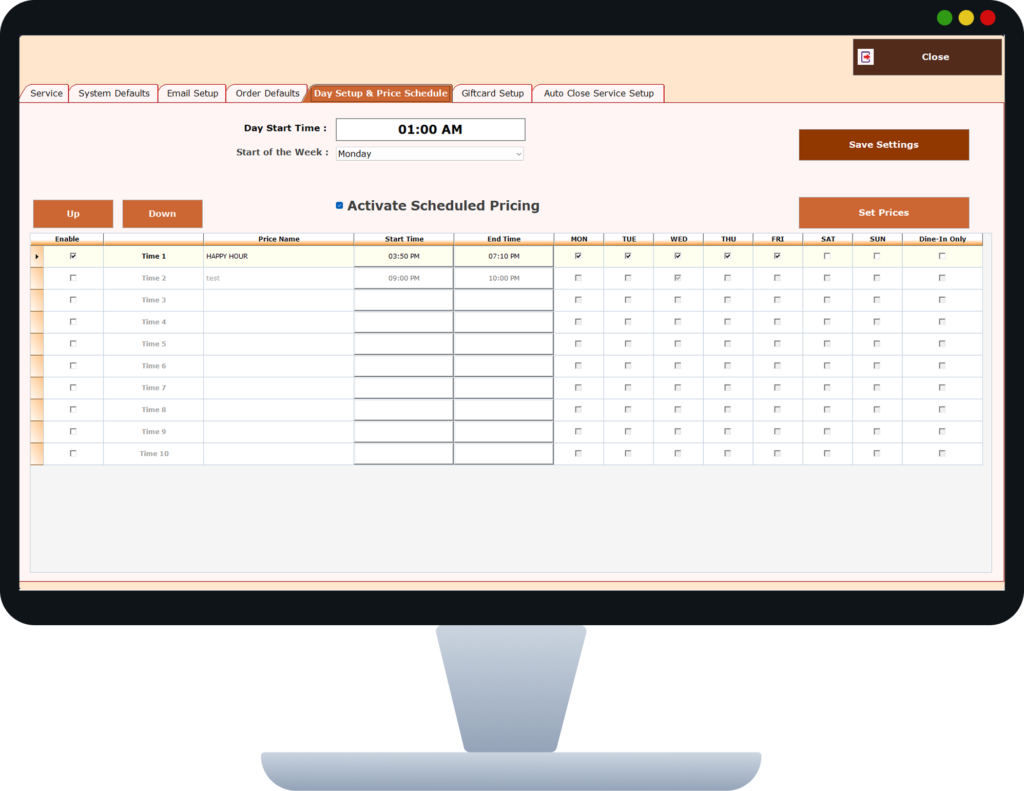
Automatically apply special pricing during predefined happy hour time slots. This encourages customer visits during slow periods and increases overall revenue. Pricing rules remain consistent across all POS devices.
Key Benefits
- Increased sales during low-traffic hours
- Eliminates manual discounting
- Ensures consistent pricing
- Boosts promotional effectiveness
How It Works
Time-based pricing rules are configured in advance. The POS activates special pricing automatically during the defined hours.

Discounts & Promotions
Create and manage promotional discounts, coupons, and special offers.
Discounts & Promotions
Create flexible discount rules for offers, coupons, and promotional campaigns. This feature supports targeted marketing strategies while maintaining control over discount misuse. All promotions are fully traceable.
Key Benefits
- Encourages repeat visits
- Supports marketing campaigns
- Controlled discount application
- Improved revenue tracking
How It Works
Discounts are applied based on predefined rules and permissions. Every discount is logged for reporting and audit purposes.
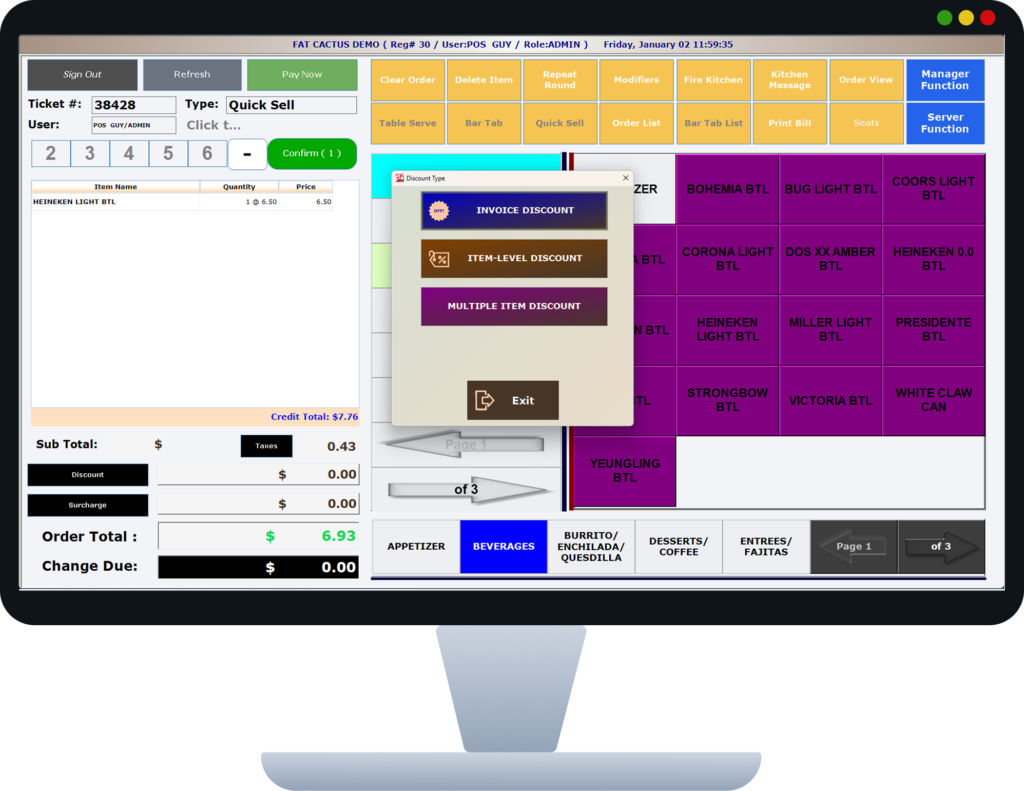
Create flexible discount rules for offers, coupons, and promotional campaigns. This feature supports targeted marketing strategies while maintaining control over discount misuse. All promotions are fully traceable.
Key Benefits
- Encourages repeat visits
- Supports marketing campaigns
- Controlled discount application
- Improved revenue tracking
How It Works
Discounts are applied based on predefined rules and permissions. Every discount is logged for reporting and audit purposes.

Digital Receipts
Send receipts instantly via Text Message or Email — go paperless.
Digital Receipts
Send receipts digitally via SMS, email, or QR code. Digital receipts enhance customer convenience while reducing paper and printer maintenance costs. They also support easy record-keeping for customers.
Key Benefits
- Faster and contactless checkout
- Reduced printing costs
- Eco-friendly operations
- Easy receipt retrieval
How It Works
Once payment is completed, the system automatically delivers the receipt via the selected digital channel.
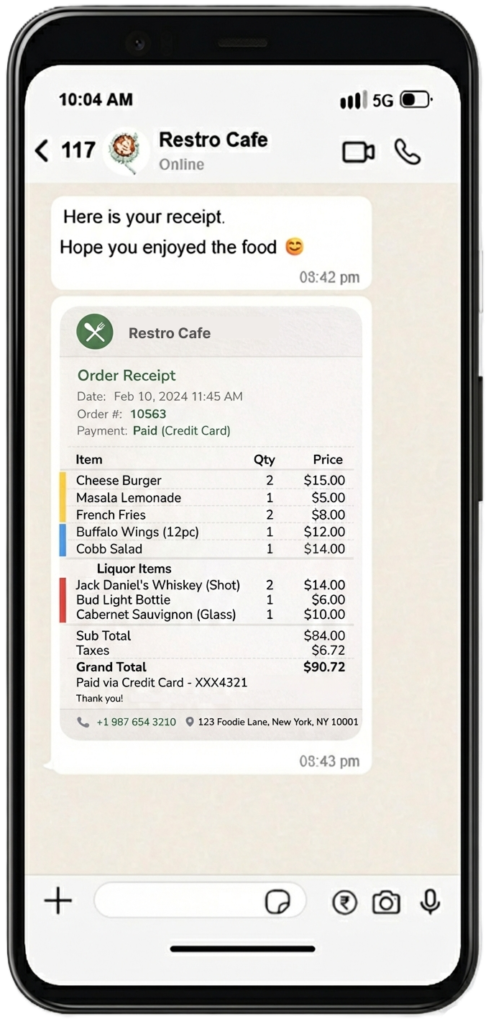
Send receipts digitally via SMS, email, or QR code. Digital receipts enhance customer convenience while reducing paper and printer maintenance costs. They also support easy record-keeping for customers.
Key Benefits
- Faster and contactless checkout
- Reduced printing costs
- Eco-friendly operations
- Easy receipt retrieval
How It Works
Once payment is completed, the system automatically delivers the receipt via the selected digital channel.

Purchase & Vendor Management
Track vendor purchases and manage your inventory costs efficiently.
Purchase & Vendor Management
Manage suppliers, purchase orders, and invoices from a centralized system. This feature provides better visibility into procurement activities and vendor performance. It helps control food costs and operational expenses.
Key Benefits
- Streamlined purchasing process
- Improved vendor tracking
- Better cost control
- Reduced paperwork
How It Works
Purchase orders are created, goods are received, and invoices are matched within the POS. Inventory updates automatically upon receipt.
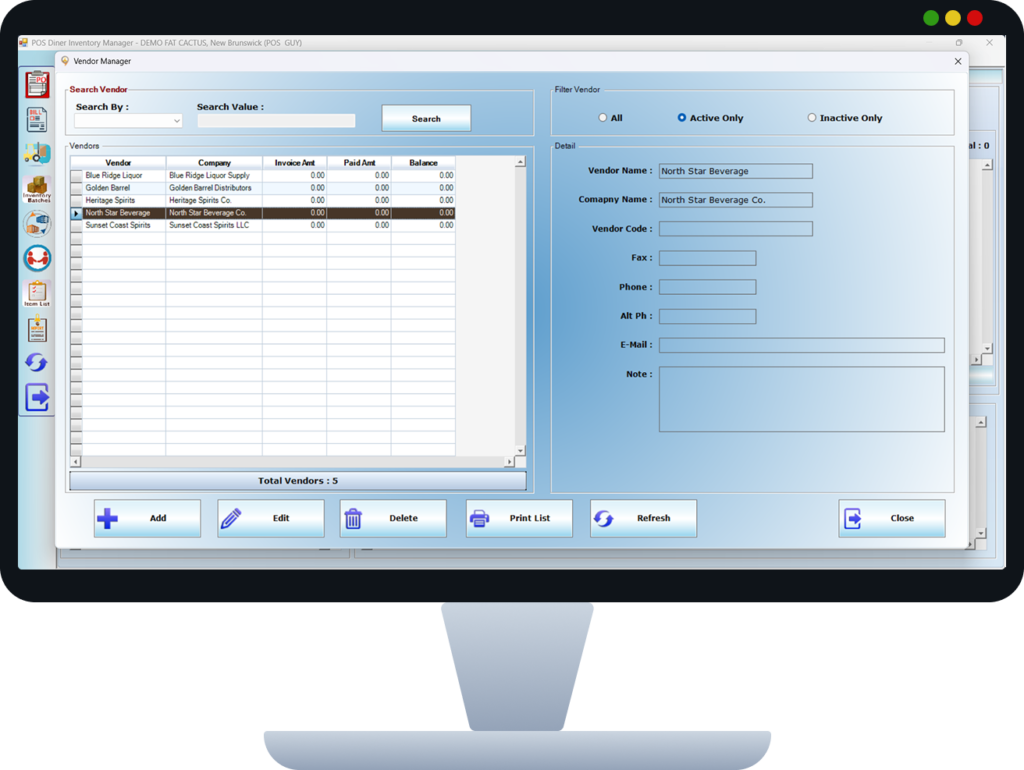
Manage suppliers, purchase orders, and invoices from a centralized system. This feature provides better visibility into procurement activities and vendor performance. It helps control food costs and operational expenses.
Key Benefits
- Streamlined purchasing process
- Improved vendor tracking
- Better cost control
- Reduced paperwork
How It Works
Purchase orders are created, goods are received, and invoices are matched within the POS. Inventory updates automatically upon receipt.

Low Stock Alerts
Get notified automatically when inventory items fall below threshold levels.
Low Stock Alerts
Receive automatic alerts when inventory levels fall below minimum thresholds. This ensures timely replenishment and prevents service disruption due to stock shortages. Alerts can be customized by item or category.
Key Benefits
- Avoids stock-outs
- Improves inventory planning
- Reduces emergency purchases
- Ensures operational continuity
How It Works
The POS continuously monitors stock levels and triggers alerts when limits are reached.
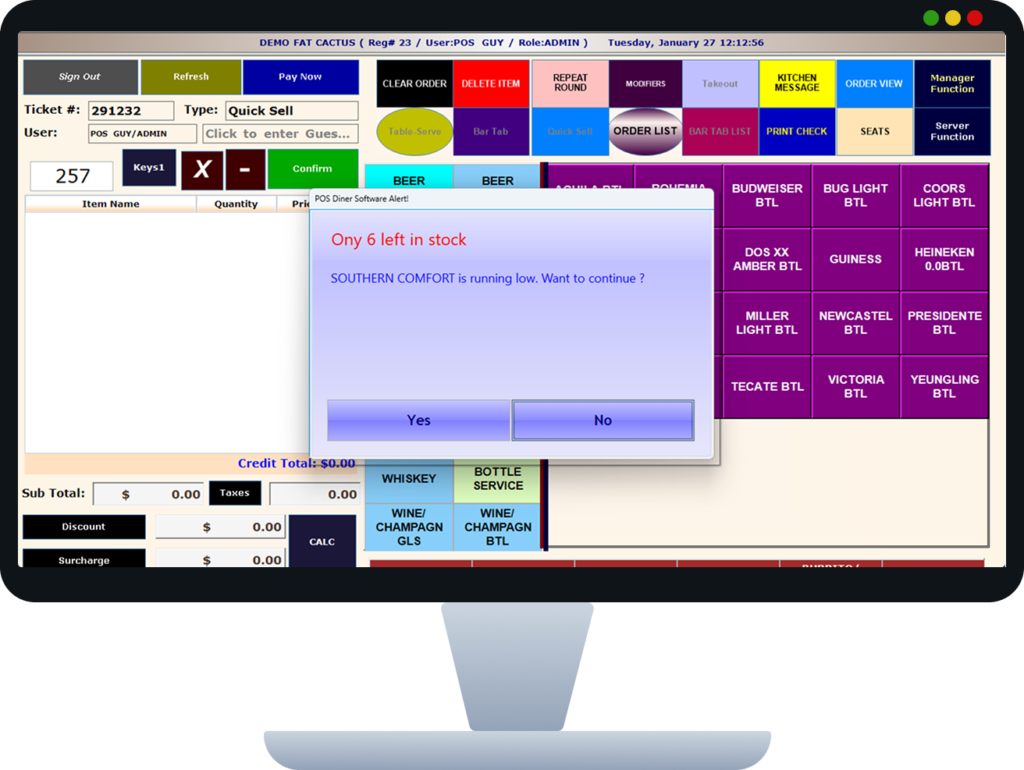
Receive automatic alerts when inventory levels fall below minimum thresholds. This ensures timely replenishment and prevents service disruption due to stock shortages. Alerts can be customized by item or category.
Key Benefits
- Avoids stock-outs
- Improves inventory planning
- Reduces emergency purchases
- Ensures operational continuity
How It Works
The POS continuously monitors stock levels and triggers alerts when limits are reached.

Kitchen Display System (KDS)
Digital kitchen screens for order management — no more paper tickets.
Kitchen Display System (KDS)
Replace paper tickets with a digital kitchen display showing live orders. The KDS improves kitchen efficiency by prioritizing orders and reducing preparation errors. It enhances communication between the front and back of the house.
Key Benefits
- Faster order processing
- Improved kitchen efficiency
- Reduced paper usage
- Clear order tracking
How It Works
Orders appear instantly on kitchen screens with timers and status indicators. Staff update progress directly on the display.

Replace paper tickets with a digital kitchen display showing live orders. The KDS improves kitchen efficiency by prioritizing orders and reducing preparation errors. It enhances communication between the front and back of the house.
Key Benefits
- Faster order processing
- Improved kitchen efficiency
- Reduced paper usage
- Clear order tracking
How It Works
Orders appear instantly on kitchen screens with timers and status indicators. Staff update progress directly on the display.

Kitchen Station Routing
Route items to specific stations: Grill, Fryer, Salad, Bar, and more.
Kitchen Station Routing
Automatically route menu items to specific kitchen stations. This ensures each station handles only relevant preparation tasks, improving speed and accuracy. It is ideal for multi-station kitchens.
Key Benefits
- Streamlined kitchen workflow
- Reduced preparation errors
- Faster service
- Improved coordination
How It Works
Items are assigned to stations during configuration. Orders are routed digitally to the correct station display or printer.
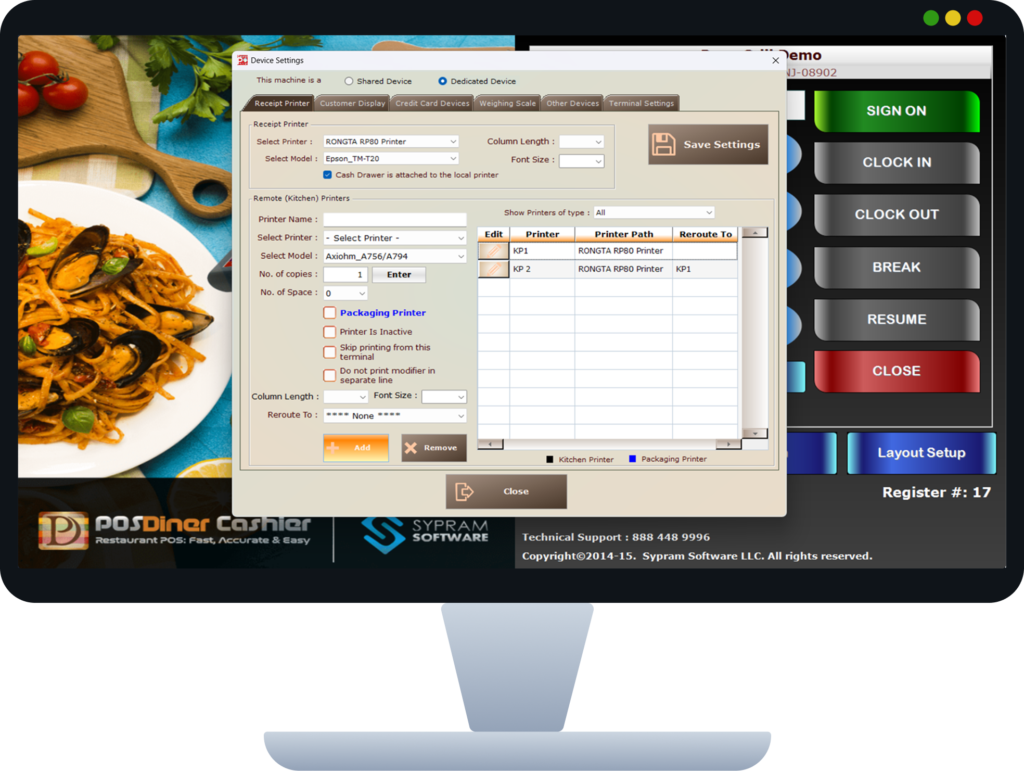
Automatically route menu items to specific kitchen stations. This ensures each station handles only relevant preparation tasks, improving speed and accuracy. It is ideal for multi-station kitchens.
Key Benefits
- Streamlined kitchen workflow
- Reduced preparation errors
- Faster service
- Improved coordination
How It Works
Items are assigned to stations during configuration. Orders are routed digitally to the correct station display or printer.

Table Layout Designer
Create custom floor plans with drag-and-drop table arrangement.
Table Layout Designer
Design and manage restaurant floor layouts digitally. This provides a real-time visual of table occupancy and availability. It helps staff manage seating more efficiently.
Key Benefits
- Improved seating management
- Better space utilization
- Faster table identification
- Enhanced staff coordination
How It Works
Managers design layouts using drag-and-drop tools. Table status updates automatically as orders and bills progress.
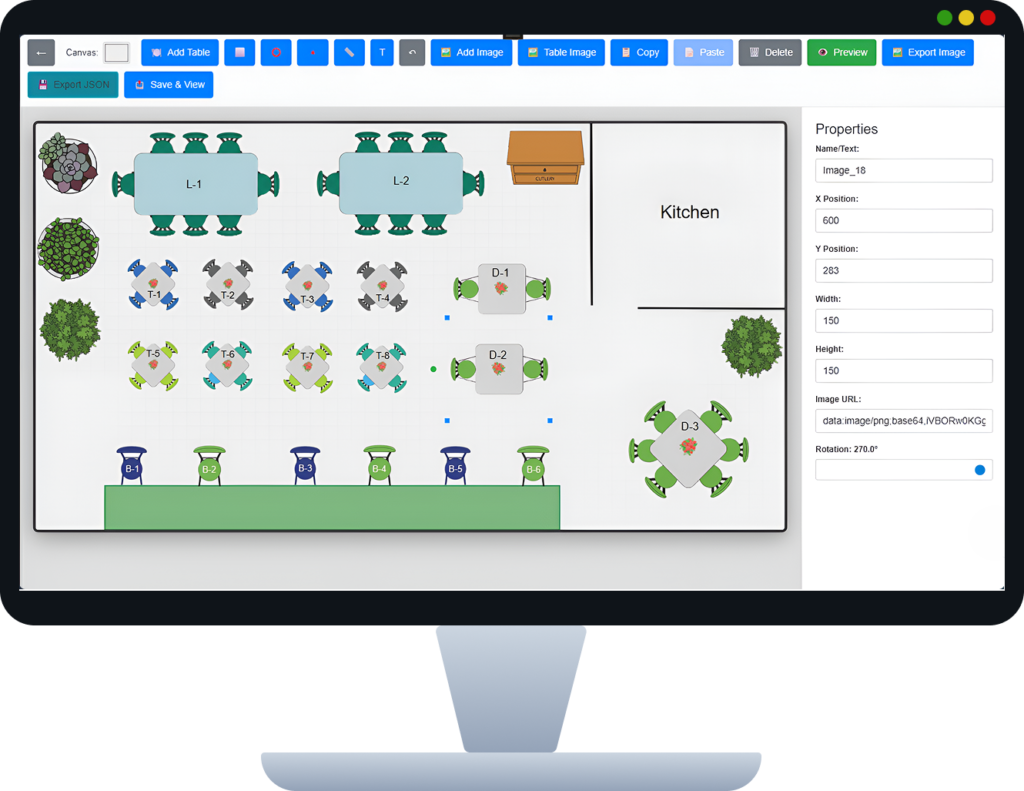
Design and manage restaurant floor layouts digitally. This provides a real-time visual of table occupancy and availability. It helps staff manage seating more efficiently.
Key Benefits
- Improved seating management
- Better space utilization
- Faster table identification
- Enhanced staff coordination
How It Works
Managers design layouts using drag-and-drop tools. Table status updates automatically as orders and bills progress.

Online Payment Gateway
Accept online payments with integrated payment gateway support.
Online Payment Gateway
Accept secure online payments through integrated gateways. This supports modern payment preferences and reduces dependency on cash handling. Payments are processed securely and quickly.
Key Benefits
- Faster Payment processing
- Secure transactions
- Reduced cash handling
- Improved customer experience
How It Works
Customers complete payments via integrated gateways directly from the POS billing interface.
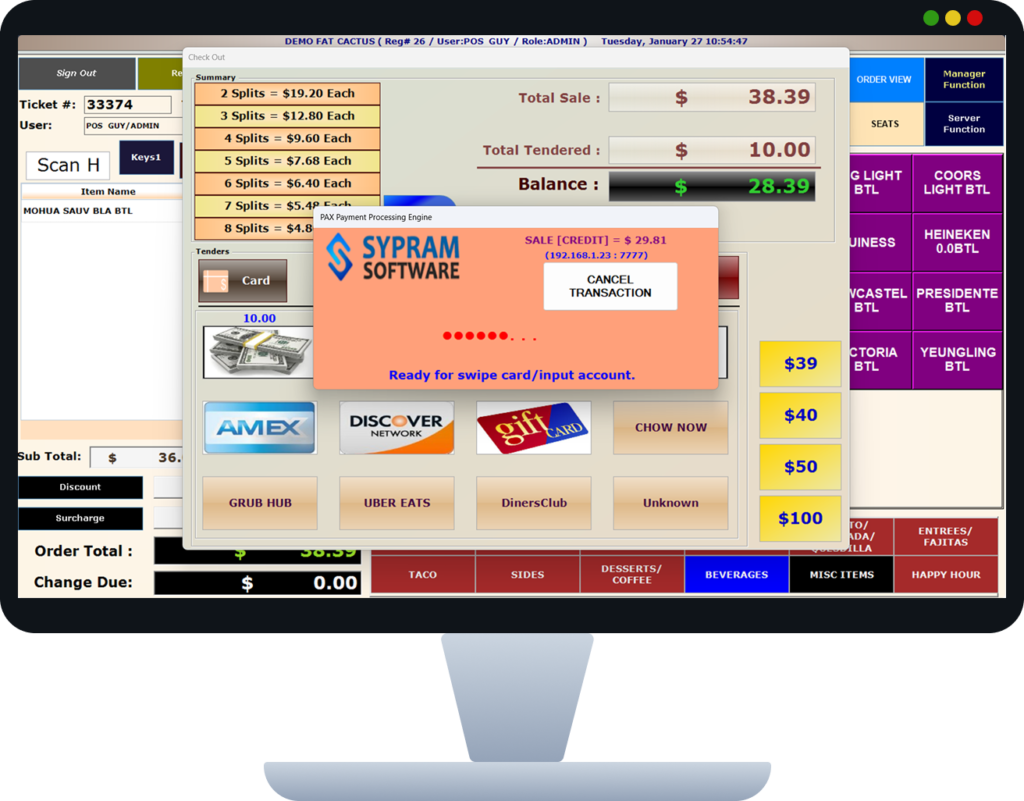
Accept secure online payments through integrated gateways. This supports modern payment preferences and reduces dependency on cash handling. Payments are processed securely and quickly.
Key Benefits
- Faster Payment processing
- Secure transactions
- Reduced cash handling
- Improved customer experience
How It Works
Customers complete payments via integrated gateways directly from the POS billing interface.

Multi-Payment Mode
Accept Cash, Credit Card, Debit Card, Apple Pay, and Google Pay.
Multi-Payment Mode
Support multiple payment methods within a single bill. This allows customers to split payments conveniently across different modes. It is especially useful for group dining scenarios.
Key Benefits
- Customer-friendly billing
- Faster checkout
- Supports mixed payment methods
- Reduced disputes
How It Works
The cashier selects multiple payment options during checkout. The POS calculates and records each payment correctly.
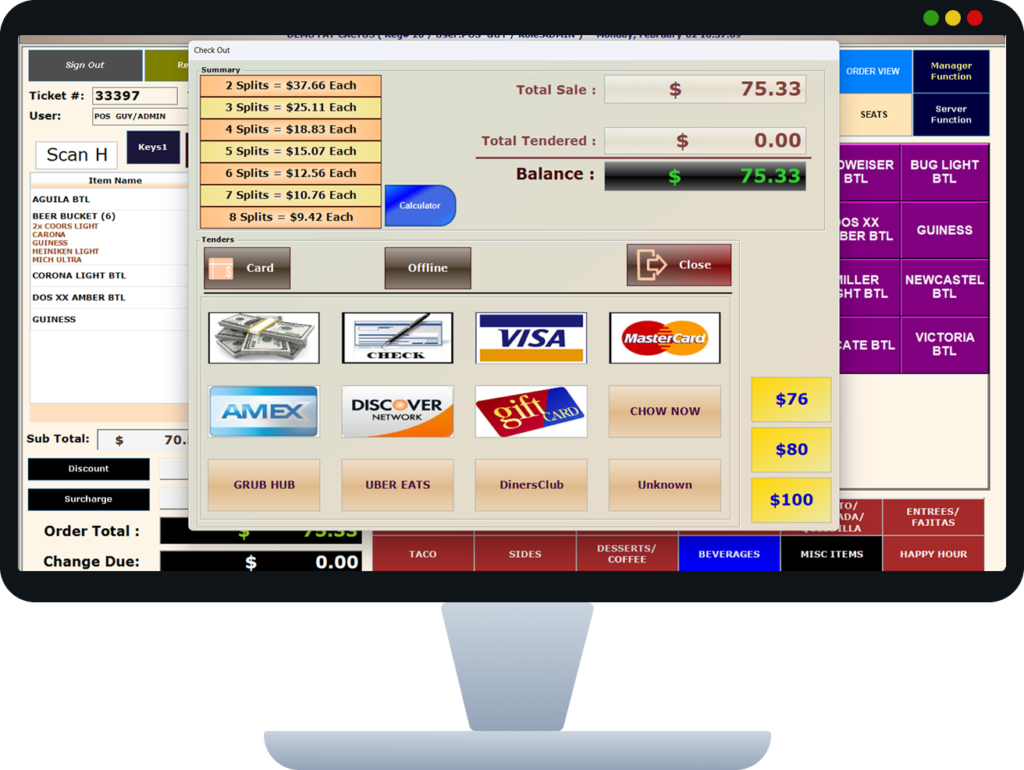
Support multiple payment methods within a single bill. This allows customers to split payments conveniently across different modes. It is especially useful for group dining scenarios.
Key Benefits
- Customer-friendly billing
- Faster checkout
- Supports mixed payment methods
- Reduced disputes
How It Works
The cashier selects multiple payment options during checkout. The POS calculates and records each payment correctly.

Cash Management
Track cash flow, manage drawers, and reconcile end-of-day reports.
Cash Management
Track cash inflow, outflow, and drawer balances accurately. This improves financial transparency and reduces the risk of discrepancies. It supports shift-wise and daily reconciliation.
Key Benefits
- Reduced cash discrepancies
- Improved accountability
- Accurate daily reports
- Secure cash handling
How It Works
Every cash transaction is logged automatically. The system generates end-of-shift and end-of-day summaries.
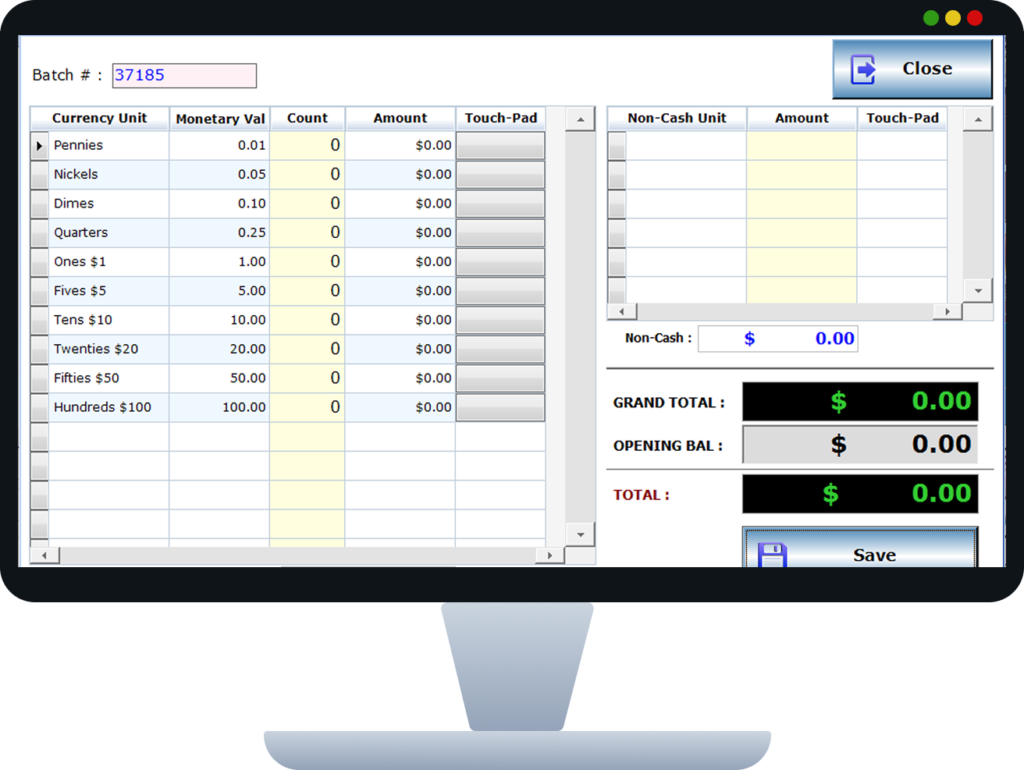
Track cash inflow, outflow, and drawer balances accurately. This improves financial transparency and reduces the risk of discrepancies. It supports shift-wise and daily reconciliation.
Key Benefits
- Reduced cash discrepancies
- Improved accountability
- Accurate daily reports
- Secure cash handling
How It Works
Every cash transaction is logged automatically. The system generates end-of-shift and end-of-day summaries.
Menu Management
Easily update menus, prices, and availability in real-time.
Menu Management
Centrally manage menu items, pricing, and availability. This ensures consistent menus across all POS devices and outlets. Changes can be made instantly without reprinting menus.
Key Benefits
- Instant menu updates
- Reduced operational costs
- Consistent pricing
- Better control
How It Works
Menu updates are performed from a central dashboard and synced in real time across devices.
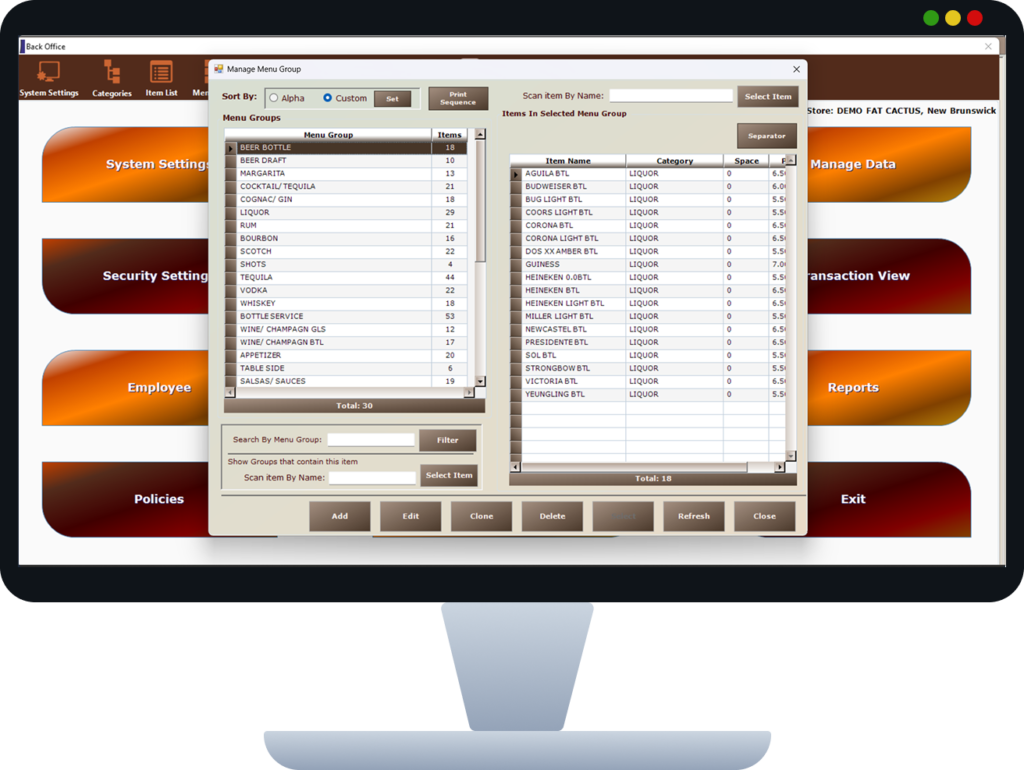
Centrally manage menu items, pricing, and availability. This ensures consistent menus across all POS devices and outlets. Changes can be made instantly without reprinting menus.
Key Benefits
- Instant menu updates
- Reduced operational costs
- Consistent pricing
- Better control
How It Works
Menu updates are performed from a central dashboard and synced in real time across devices.

Tax Configuration
Configure sales tax, service charges, and gratuity automatically.
Tax Configuration
Configure applicable taxes or service charges. This ensures compliance with local tax regulations and transparent billing for customers.
Key Benefits
- Accurate tax calculation
- Legal compliance
- Reduced manual effort
- Clear tax breakdown
How It Works
Tax rules are defined once and applied automatically to every transaction.
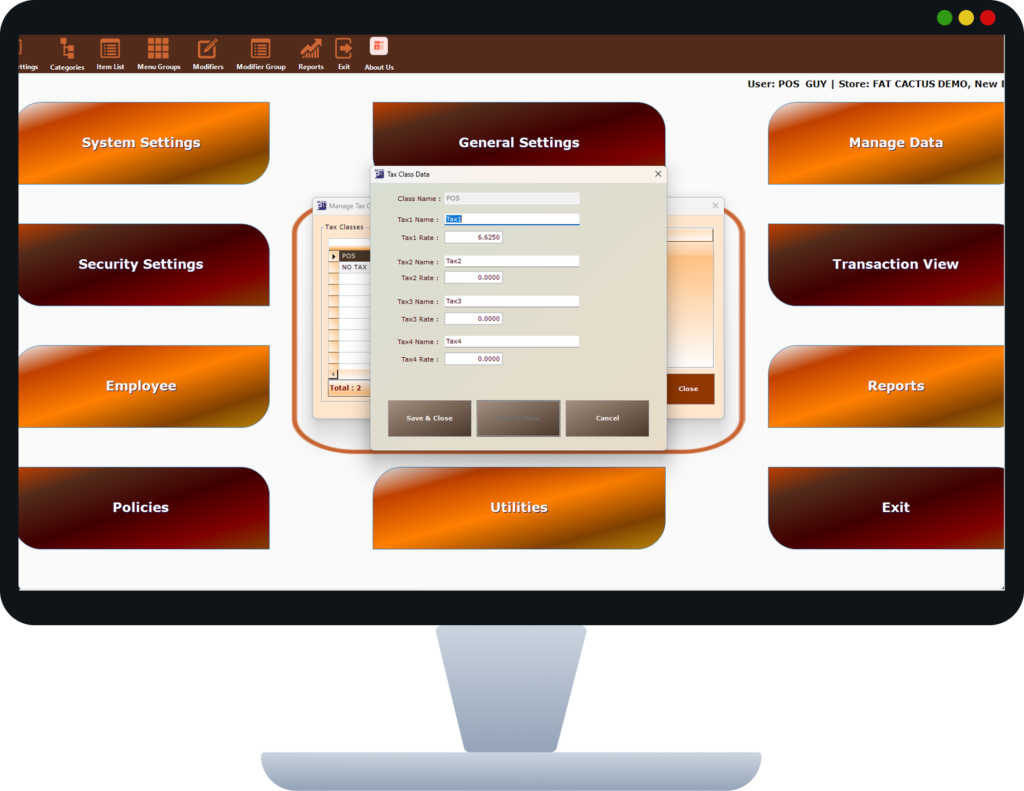
Configure applicable taxes or service charges. This ensures compliance with local tax regulations and transparent billing for customers.
Key Benefits
- Accurate tax calculation
- Legal compliance
- Reduced manual effort
- Clear tax breakdown
How It Works
Tax rules are defined once and applied automatically to every transaction.

User Access Controls
Define role-based permissions for staff, managers, and admins.
User Access Controls
Control system access using role-based permissions. This protects sensitive features and ensures accountability across staff roles.
Key Benefits
- Enhanced security
- Controlled access
- Reduced misuse
- Clear reponsibility
How It Works
Permissions are assigned per role, restricting access to specific POS functions.
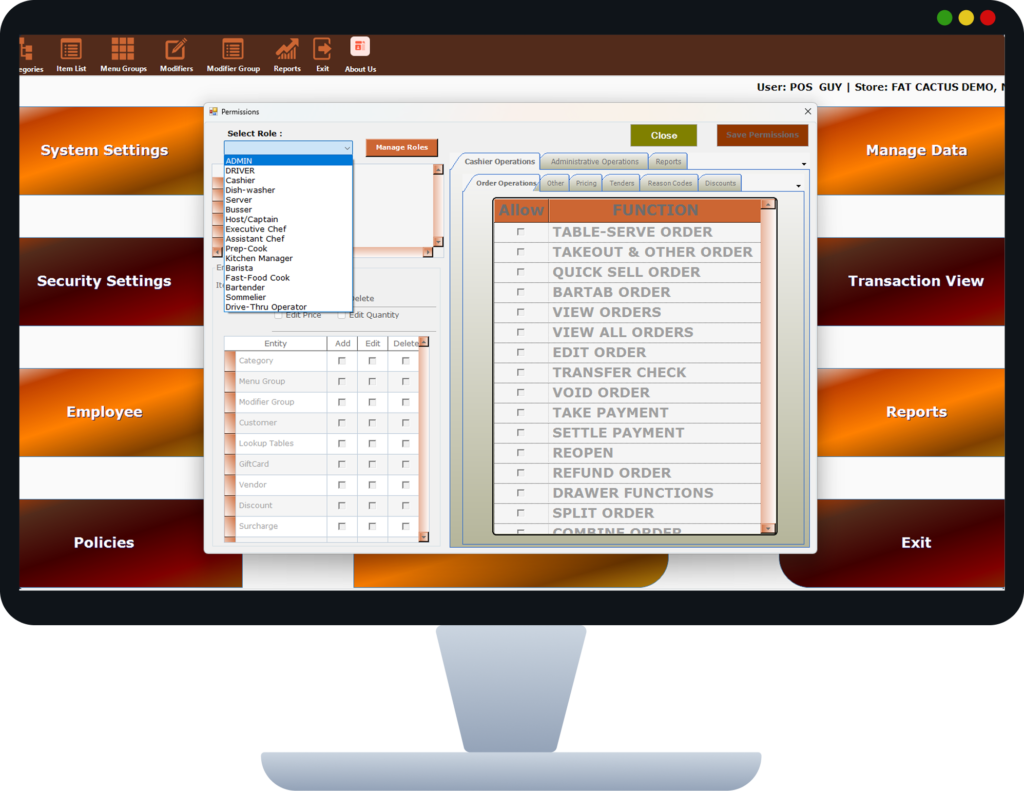
Control system access using role-based permissions. This protects sensitive features and ensures accountability across staff roles.
Key Benefits
- Enhanced security
- Controlled access
- Reduced misuse
- Clear reponsibility
How It Works
Permissions are assigned per role, restricting access to specific POS functions.

Cloud Sync
Real-time data sync across all devices with secure cloud backup.
Cloud Sync
Synchronize all POS data securely across devices and locations. This enables centralized monitoring, multi-branch operations, and real-time reporting.
Key Benefits
- Real-time data access
- Multi-location management
- Secure backups
- Better decision-making
How It Works
All transactions and configurations sync automatically to the cloud in real time.
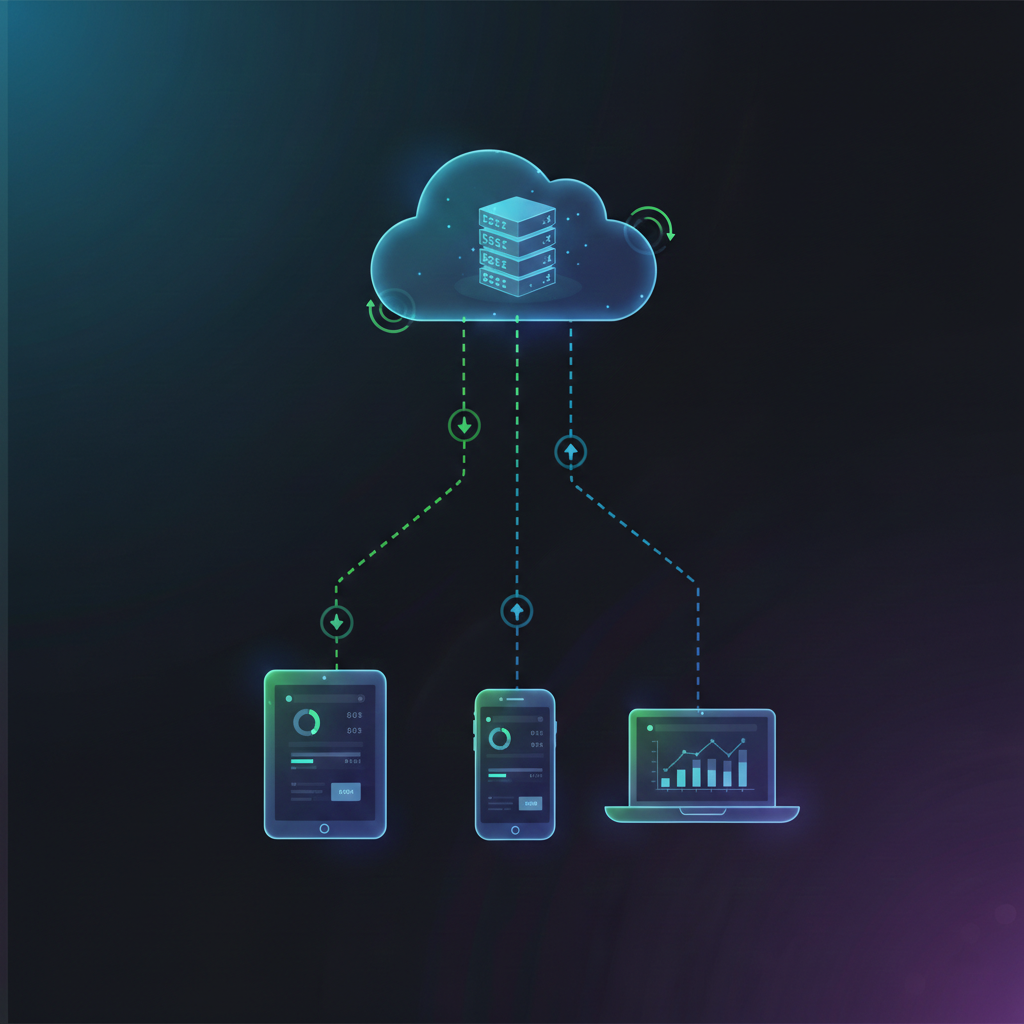
Synchronize all POS data securely across devices and locations. This enables centralized monitoring, multi-branch operations, and real-time reporting.
Key Benefits
- Real-time data access
- Multi-location management
- Secure backups
- Better decision-making
How It Works
All transactions and configurations sync automatically to the cloud in real time.
